 Sign inSign up
How to use WEFAMIEvents
Events and memorial days
Memorials, weddings, gatherings. Everyone who qualifies gets an invitation.
1The month view
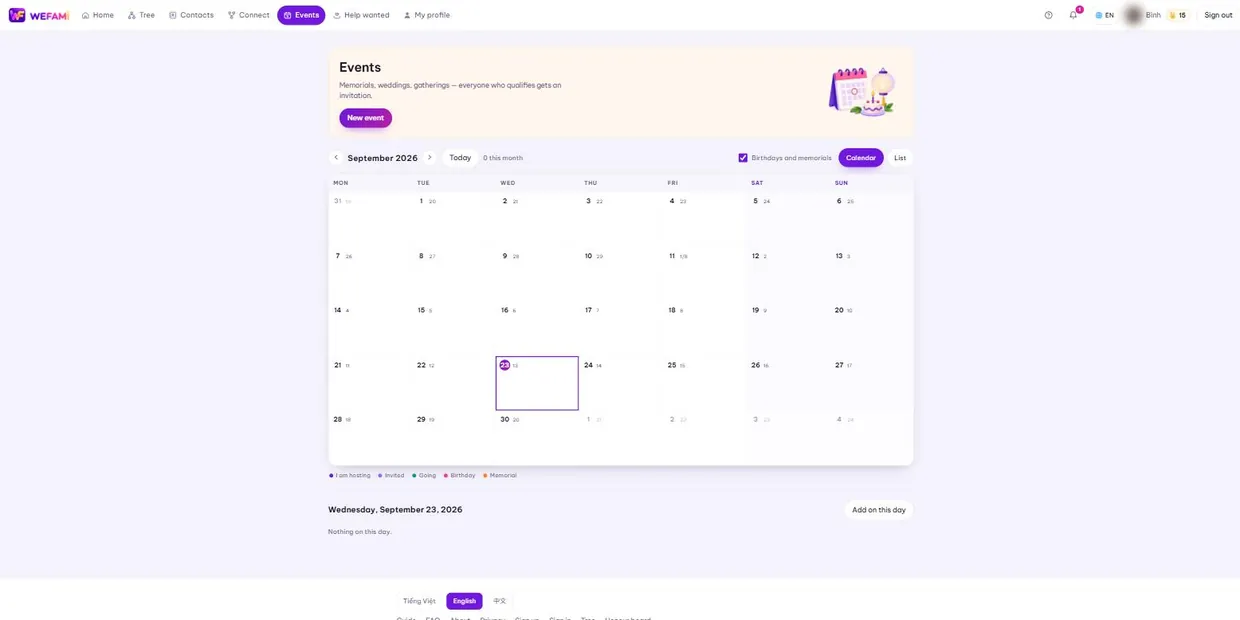
The default is a month grid, with a small second number on each day for the lunar date. Click a day to see what is on it; the List button switches to a plain list.
The colour key under the grid explains the dots: events you host, events you are invited to, ones you have accepted, birthdays, memorial days.
2Birthdays and memorials appear on their own
You do not type these in. The Birthdays and memorials tick box above the grid turns the layer on and off.
Only profiles whose birth and death dates you are allowed to see appear. A date hidden by its permissions stays hidden here too.
3Creating an event
The New event button opens the form: title, date and time, place, and who to invite.
Pick the date by solar or lunar calendar. For a memorial choose lunar — it then falls on the correct lunar day every year without anyone converting it.
4Who to invite
Invite people one by one, or a whole contact group, or by circle — close family, relatives, everyone in the tree.
An invited person who says "I will be there" earns one love point. Switching to no takes it back.
Support
Stuck on anything, however small, just write. Nothing is a silly question the first time you use something.
Calling during Vietnamese office hours is quickest; outside those hours write instead and you will hear back the next working day.
For a bug, please say: which page you were on, what you clicked when it broke, and whether you are on a computer or a phone. A screenshot helps. Never send your password — we will never ask for it.