 Sign inSign up
How to use WEFAMIWho sees what
Who sees what
A lineage is a shared thing, but an ID number is not. Every field you record can be locked separately.
1Visitors who are not signed in see nothing
No names, no photos, not even how many people are in the tree. That is the default and cannot be loosened — the tree only opens to people who are in it.
2Three circles
Between signed-in members the default is to see everything. To hide a field, move it into a tighter circle.
- Everyone in the tree — the widest circle, and the default.
- Relatives — people related to you by blood or marriage.
- Close family — parents, spouse, children, full siblings.
Data is cut at the server before it is sent, not hidden in the interface. A person without permission never receives the information at all.
3Setting each field
On a profile page, the Who sees what button opens the permission panel. Each row is one recorded field — phone, email, ID number, address, life story — and each row picks one of the three circles.
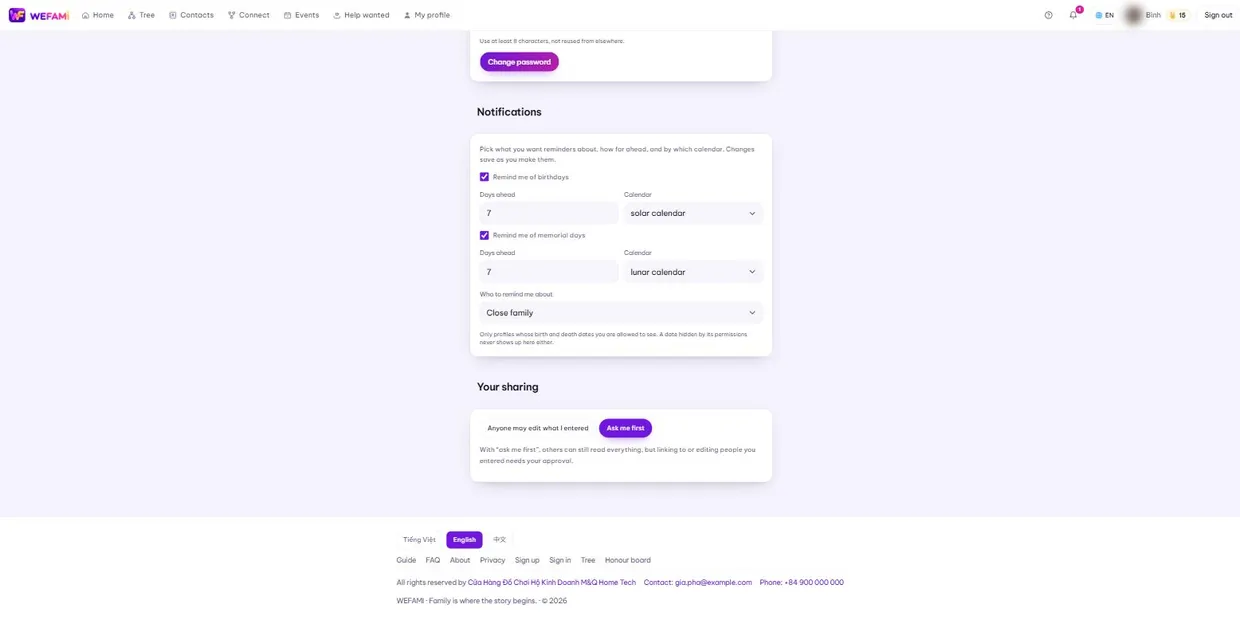
A hidden birth date also stays out of the calendar and produces no reminders, because a reminder is itself a way of leaking it.
4Your sharing
This is different from who may READ: it is about who may EDIT the profiles you entered.
Choose Anyone may edit what I entered and the family builds it together, quickly but with room for mistakes. Choose Ask me first and others can still read everything, but linking to or editing people you entered needs your approval.
Support
Stuck on anything, however small, just write. Nothing is a silly question the first time you use something.
Calling during Vietnamese office hours is quickest; outside those hours write instead and you will hear back the next working day.
For a bug, please say: which page you were on, what you clicked when it broke, and whether you are on a computer or a phone. A screenshot helps. Never send your password — we will never ask for it.