 Sign inSign up
How to use WEFAMIThe tree
The family tree
The whole lineage on one chart. This is where you build it and move between branches.
1Reading one card
Each person is a card. One look tells you whether they are living, their sex, and whether they hold an account.
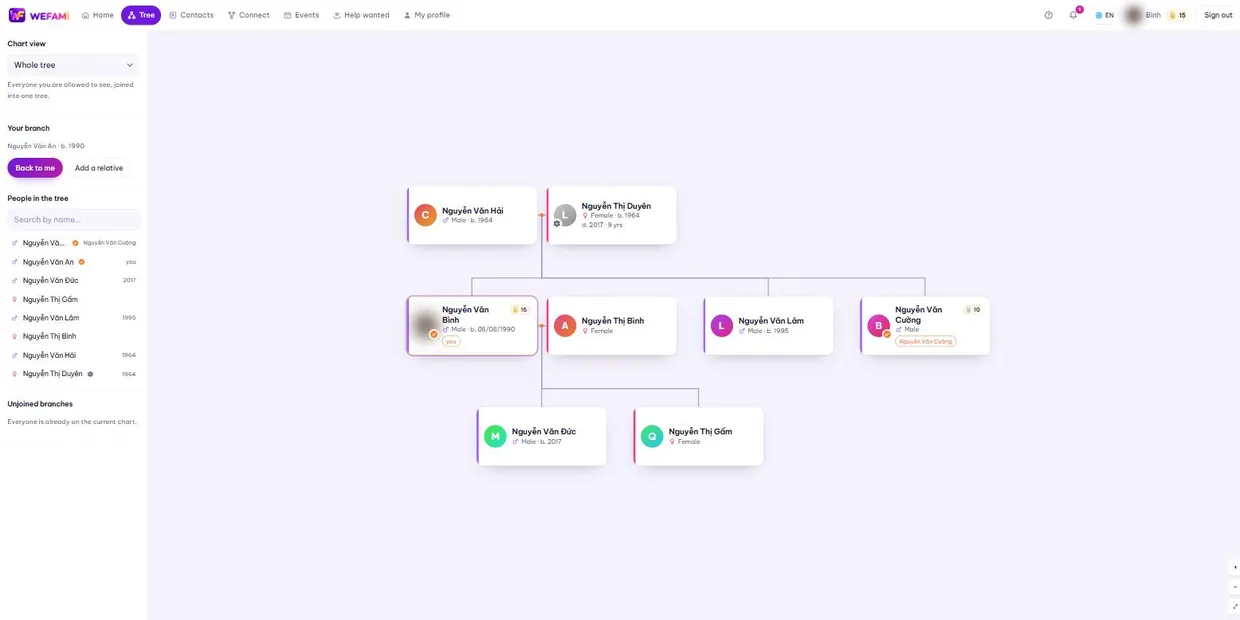
- Orange tick — the person themselves has claimed this profile and now keeps it.
- White chrysanthemum with a greyed photo — they have died; below it says the year and how long ago.
- ♂ and ♀ — sex, shown with the birth year so people with the same name do not blur together.
- The coloured edge on the left — one colour per couple, so you can tell whose children are whose.
2Four sides
The selector at the top left changes which part of the tree is drawn. There is no "whole tree" option — the larger the lineage, the more useless drawing all of it becomes, with hundreds of cards from four or five different families piled on one chart.
The four options are the four sides a family actually has names for, the way people talk when they open a lineage book.
- My father’s side — your paternal relatives. Your mother still appears, as your father’s wife, but her parents do not.
- My mother’s side — the reverse.
- Spouse’s father’s side — your husband’s or wife’s paternal family.
- Spouse’s mother’s side — their maternal family.
You, your spouse and your descendants belong to all four sides, so you stay on the chart whichever side you pick. With no spouse recorded the last two are greyed out — record one and they open up.
3Adding a relative
Click a card and pick the relationship. You choose the relationship first and type the name after, so there is no way to attach someone to the wrong place.
Parents are capped at one father and one mother: once both exist the add button greys out. That cap is deliberate — nobody has more than two parents, and one mistake there tilts a whole branch. Children have no cap.
Attach parents as soon as you can. Two people with the same name and birth year but different parents is ordinary in a large lineage; with parents recorded they never get confused again.
4More than one spouse
Common in Vietnamese lineages. WEFAMI does not pool all the children together — it keeps them under the couple they belong to.
Add the second spouse as usual. When you add a child, pick the right couple in the "whose child" box; on the chart the child then joins that couple’s node and follows that couple’s colour.
5The four counts, and the way back
The left column counts how many people are on each side. Click a row and the chart switches to that side — no need to reach back up to the selector.
The four numbers overlap: you, your spouse and your descendants belong to all four sides, so adding them up gives more than the real total. That is correct — the question here is "how many are on that side", not "split the family into four parts".
The Back to me button returns you to your own profile. Getting lost in a large lineage is normal; this is the way home.
6Finding anyone at all
Because the chart only draws four sides, some people are on none of them: a daughter-in-law’s parents, a branch not yet joined to you, distant relatives another household entered. The Advanced lookup button at the foot of the left column opens a page that searches the whole tree.
Search by name — including the name they go by and any foreign name — then filter by any field that has been recorded: side, living or died, sex, birth and death year ranges, where they are from, where they live, work, schooling, interests, ID number, burial place and type. The common boxes are there from the start; the rest open with More filters.
Each result row says which side that person is on and what you call them — grandfather, uncle, daughter-in-law, cousin. Results are paged, twenty-five to a page.
The "which side" filter has an extra option, Outside all four sides. That is where you find the people the chart no longer draws.
7On a phone
On a narrow screen the list of people sits in a sheet at the bottom that you drag up and down. Pull the short bar at the top of the sheet to open or close it.
Pinch with two fingers to zoom the chart, drag with one to move it.
Support
Stuck on anything, however small, just write. Nothing is a silly question the first time you use something.
Calling during Vietnamese office hours is quickest; outside those hours write instead and you will hear back the next working day.
For a bug, please say: which page you were on, what you clicked when it broke, and whether you are on a computer or a phone. A screenshot helps. Never send your password — we will never ask for it.